

 星渡
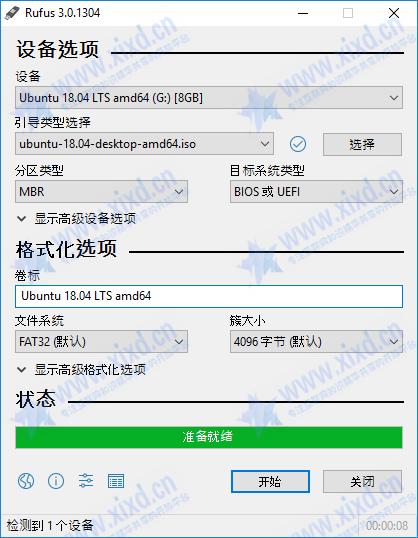
星渡 Rufus,小巧实用开源免费的U盘系统启动盘制作工具和格式化U盘的小工具,它可以快速将ISO镜像文件制作成可引导的USB启动安装盘,支持Windows或Linux启动,堪称写入镜像速度最快的U盘系统制作工具。

支持的操作系统ISO镜像:
Arch Linux, Archbang, BartPE/pebuilder, CentOS, Damn Small Linux, Debian, Fedora, FreeDOS,
FreeNAS, Gentoo, GParted, gNewSense, Hiren’s Boot CD, LiveXP, Knoppix, KolibriOS,Kubuntu, Linux Mint, NT Password Registry Editor, Parted Magic, Partition Wizard, Raspbian, ReactOS, Red Hat, rEFInd, Slackware, Super Grub2 Disk, Tails, Trinity Rescue Kit, Ubuntu, Ultimate Boot CD, Windows XP (SP2+), Windows Vista, Windows Server 2008, Windows 7, Windows 8, Windows 8.1, Windows Server 2012, Windows 10, Windows Server 2016,
对ISO支持的说明:
3.18 (2022.03.11)
Fix DLL sideloading vulnerabilities
Fix ISO → ESP creation when running on Windows 11
Fix an issue when detecting network connectivity when the DHCP service is disabled
Update FreeDOS to version 1.3
Add bypass of Windows 11 restrictions for in-place upgrades
Add Miracle Linux 8 to the list of Red Hat exceptions
Other internal fixes and improvements
最近更新:
- 添加 Windows 11 扩展安装支持(解除TPM/安全启动/RAM要求)
- 添加 UEFI Shell ISO 下载
- 支持英特尔 NUC 读卡器
Rufus v1.10 及之后的所有版本都支持从ISO镜像 (.iso) 创建可引导USB启动盘。
下载链接:https://6tc.lanzout.com/is6XM2f5euuh
1,本站所有资源来源于用户上传和网络,不代表本站立场,如有侵权请邮件联系站长!
2,本站教程和软件分享目的仅供大家学习和交流,请不要用于商业用途,下载后请于24小时后删除!
3,如有链接无法下载,请联系站长处理!邮箱:xixd123@qq.com
4,特别声明:所有软件仅供参考学习,不提供技术支持。
5,压缩包内部如无特别说明,统一解压密码为:www.xixd.cn
5,如果您喜欢该程序,请支持正版,购买注册,得到更好的正版服务。如有侵权请邮件与我们联系处理。敬请谅解!





评论框